EasyGerb 5: The Ultimate Gerber Export Tool for AutoCAD Users...
|
|
|
|
![]() |
|||
|
EasyGerb is an ARX Plug-In, perfect for AutoCAD users looking for the easiest & most powerful way to output gerber files. |
||||
NO DXF OR DWG FILES NEEDED - EasyGerb outputs Gerber files in the same time it takes to create a DXF!
Movie Tutorial: See EasyGerb in-action on YouTube. |
Movie Tutorial: Watch EasyGerb Online Demo Movie > |
Movie Tutorial: Using EasyGerb to Build a Composite Layer (Dark/Clear Layer Merging) > |
TUTORIAL: Load EasyGerb into AutoCAD, configure, and convert to Gerber.EasyGerb
allows you to export Gerber files directly from AutoCAD - Simply select
any objects and begin creating Gerber files - instantly! This tool is by
far the easiest-to-use Gerber conversion solution for any AutoCAD user
and converts from AutoCAD to Gerber in the time it takes to make a DXF
file!
|
![]() |
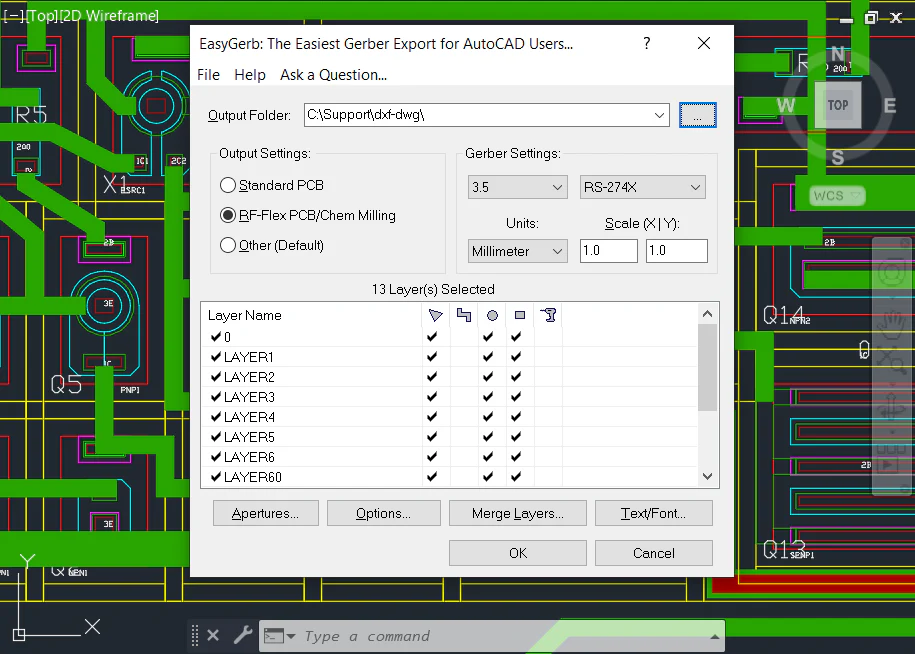
Start & Configure EasyGerb, Load EasyGerb inside AutoCAD using the command "appload". Once EasyGerb starts, you will see the main screen (see right). Simply check the layers you want to convert, and configure any other options you require. Press button "OK" to select entities for gerber conversion. |
![]() |
![]() |
Select Entities..., Since EasyGerb runs inside AutoCAD, you can use all the powerful selection tools that already exist, to choose the entities you want to convert to gerber. Note: If your drawing contains title blocks, reference lines, or other non-essential conversion objects, you do not need to select them. Only EasyGerb lets you selectively choose what entities you want to convert; avoiding excess data & processing time. |
![]() |
![]() |
The Gerber Conversion is Done!, When EasyGerb has finished the conversion a report dialog displays the count of entities converted, location of the gerber files, and any warnings. You can now instantly view the converted gerber files by clicking on the button 'View Gerbers with FAB 3000'. If you wish to use another gerber viewer program, simply start that program and load the gerber files. After viewing the gerber files, you can now send them directly to your photo-plotter or board shop. Note: If you perform more than 1-2 conversions per year, we strongly recommend that you purchase the EasyGerb + FAB 3000 Bundle. This will allow you to seamlessly convert, view, edit, and run DRC/DFM checks on your gerber files. |
![]() |


STAY IN TOUCH
Twitter Facebook Youtube