The Leader in CAD Viewers, Translators, and Custom EDA Solutions™
Join us on Twitter Visit our blog! Like us on Facebook View the Numerical Innovations RSS Feed


Assures your Gerber, Drill, & ODB++ files are Ready for PCB Manufacturing.
Includes Free: DFM Check, Netlist Extraction, IPC Netlist Import, Area Calculation & more!
Get Free Quotations from various PCB manufactures worldwide in the Open PCB Marketplace.
 
 
  • Testimonials
  • Features
  • White Papers
  • Advertise
  • Download Now

Here's what they say about DFM Now!...

"Many thanks for your DFMnow tool, an invaluable help !" Robert Lacoste - ALCIOM

"Yes, DFM Now! exceed my expectations. I give it 10/10!" Keshava - Monsoon Multimedia

"So far I'm impressed with what comes for free with DFM Now. It is far superior to any other free Gerber Viewer I have downloaded." Alan Gardner - Woods Whole Oceanographic Institution

"DFM Now! It met my expectations, it looks pretty slick and it is pretty fast too." Paul Alexandrescu – Creation Technologies

"I used GCPrevue before. Now I switched to DFM Now!" Chi – Armour Automotive

"Your product has surpassed all my expectations when working with the format ODB++. Everything is great!" Ilya Solunov

"So far your program exceed our expectation. As freeware DFM Now! rates as 10 of 10." Mark Kroik - GuardTrax

"Yes it did genuinely exceed my expectations. I am basically a one-man-band and so have only intermittent use for DFM Now! but it does everything I need and more. Excellent - Great Software." David Crump - Thermalab

"DFM Now! works exceptionally well, and I'm very happy with it." Phil Lesley - Sequestered Solutions Corporate

"I needed a Gerber viewer to review Gerber files. A small change had been made to an existing pcb, and I needed to see that the change had been properly implemented. DFM Now! Exceeded my expectations. It handled a very big file, and was very easy to use.My overall experience was very positive." Jonathan Schiff – Heart Ware Inc.

"Once getting the gerbers to the proper layer DFM-now works very very well. Just yesterday I recommended it to our fab in China. They liked it too." Lars Andersson – Bellman & Symphon AB

"DFM Now! is a fine program. I run it on two machines and it works exactly as expected." Ed Mutka -Eastern Elite Audio Video

"So far, so good." - Mallory Nicholls

"DFM Now! is pretty good. Considering I've only used it for 20 minutes and I didn't have to read the manual to figure out how it worked. Happy about that!" - Mike

"DFM Now! looks promising in comparison to GCPrevue." - Andrezej

“I like the graphics” David Zirkelbach - Curtiss-Wright Controls Electronic Systems

“I’m very pleased with DFM Now, compared to others I’ve tried it’s very powerful!” Larry Johnson - Sunair

“I have viewed sets of data with success so I am happy. I will let you know, should I have any comments in the future.” Claus Mølgaard - Quality and PTA ALPHA-elektronik A/S

Hi Miranda,
I have been looking for a product like this for a long time.  We have
been "bitten" three times in the past three years by gerber errors.  One
time was so bad I had to write this article about it:
http://www.edn.com/article/458535-Conspiracy_theory.php

Most board houses we have used can not do an IPC netlist compare.  The
one I have been using lately charges $70 per design (over & above the
charges for electrical test).  So DFM Now! saved us money
immediately!  I figure it's my responsibility anyway to provide correct
gerbers, and not depend on outsiders to check my work.

I have tried other products that claim to do netlist compare, but they
can't handle split planes, or have other problems that make them unusable.

I keep a small library of "problem" designs that typically generate
either false positives or false negatives.  DFM Now! got them all right,
with only one false positive on one board that usually gets dozens.

I ran it through my test cases in half a day and was amazed

Best regards,
===================================
Garry Motter, Engineering Manager
SciMeasure Analytical Systems, Inc.
===================================


Gerber CAM/Software - Features Comparison

DFM Now! V6

FAB 3000 V6 DFM

FAB 3000 V6 Designer

FAB 3000 V6 Professional

CAM Features    
         
General        
User Friendly & Intuitive Gerber Viewing environment.
Instantly Quote and Order Printed Circuit Boards directly from Sunstone, Imagineering, Sierra Circuits, and more.
Instant PCB Price Estimator.
Create high-resolution Adobe® PDF files (up to 'E' Size).
Save Workspace  
No Graphical ads  
No Internet required  
         
Import        
Gerber (RS-274D, RS-274X, Fire9000)
Import CAD and CAM aperture lists
HPGL
NC Drill, Rout & Mill
ODB++
Netlist (IPC-D-356 / IPC-D-356A)
DXF / DWG      
Postscript and PDF      
Part Centroid File      
Bill of Materials (BOM)      
Large Bitmap (Import huge bitmaps of any size)      
STL (3D Stereolithography) binary      
GDS-II      
         
Export        
Gerber (RS-274D, RS-274X, Fire9000)    
HPGL    
NC Drill, Rout & Mill    
ODB++      
Netlist (IPC-D-356 / IPC-D-356A)      
DXF / DWG      
Part Centroid File      
BOM File      
Large Bitmap (Export huge bitmaps of any size)      
Postscript      
IGES, STL (3D Stereolithography) binary      
GDS-II      
         
Viewing        
Complete Viewing capabilities ( Unlimited Zoom, Pan, Scrolling, etc.)
Positive / Negative Data Handling - View composites on a single layer (not separated like other CAM software tools)
Layer Information / Properties
Query: All object properties  (Dcode, Layer, and more)
Measure: Point to Point, Object to Object
Aperture and Drill Table Editing
Database Hierarchy for easy nesting of jobs within one another.
Multiple PCB layouts are placed into tabbed windows.
Find: Dcode, Net, Property, Job Insert, Composite Level
Add Ruler / Remove Rulers
Align Layers with different origins.
Redline/Markup Tool
Graphical Comparison between Layers
Graphical Comparison between Jobs
View Background Image (display scanned data over real data)  
Layer Scale X/Y  (Scale layers using separate X and Y values)  
         
Editing        
Edit (Move, Copy, Rotate, Delete, Flip, Scale, Explode, Array, Stretch, Split, Attributes, Vertex, Trim, Boolean, and more).    
Edit Layers (Alignment, Merge, Delete, Add, and more).    
Add (Flash, Trace, Polygon, Wide Path, Rectangle, Arc, Circle, Text)    
Add (Multi-Line Text, Drill Hits & Rout Paths)    
Add (Dimensions)    
2D Boolean Operations (OR, AND, XOR, Subtract, Invert, Sequential)    
De-Embed Objects (Solves the object-Inside-of-object problem)    
Composite Layer Editing (Build, Flatten, & Separate)    
Convert Draw to Flash (Interactive & Automatic)    
Convert Selected Objects to Custom Aperture    
Convert Selected Objects to New Job    
Edit/Modify existing Custom Apertures    
Merge Overlapping Objects    
Film Wizard (Optimize & combines layers for film output)    
Polygon Utilities (Join Wizard, Remove Tiny Segments, Chop Polygons, Fix Invalid Polygons)    
         
Fabrication Tools        
Copper Area Calculation
Generate PCB Border Layer
Create Fabrication Drawing
Silkscreen Optimizer    
Copper Balancing    
Etch Compensation    
Pin Hole Elimination    
Remove Pads (Isolated/Stacked)    
Redundant Line Removal    
Teardrop Creation    
Grow / Shrink (Enlarge or Reduce Objects)    
Remove Covered Data    
Generate Paste Layer    
Create Drill Layer (PTH)    
Convert Gerber Layer to Drill    
         
Netlist        
Netlist Extraction (Vector based)
Netlist Extraction (Raster based)
Netlist Extraction (Contour based)
Netlist Extraction (handles Blind/Buried Vias & Split Planes)
Netlist Extraction (handles Polygons & Composites)
Show all objects that are electronically connected across
Netlist Report
Query Nets
Measure Net to Net
View External Nets
Generate PDF Report for Netlist Comparison errors.
Netlist Compare  
Apply External Nets Names      
Edit Nets      
Netlist Table      
Find Net Shorts      
         
Design Rule Check (DFM / DRC)        
DFM Check
Signal Layers Check (Min.Trace/Space, Min Annular Ring, Min SMT Pad, etc.)
Profile Check
NC Drill Check (Find Double/Missing Hits, Touching hole, etc.)
Mask Check (Undersize & Missing Mask Clearances)
Net Check (Find Shorts/Opens)
Create your Own DFM Rules Set (use any values you wish to check your PCB)
DRC Browser Dialog to View warnings & violations
Generate PDF Reports for DFM Check warnings & violations
Silkscreen over Solder Mask  
Non-Functional Pads  
Isolated Connections  
Mask Slivers  
Power/Ground Shorts  
Copper Slivers      
Solder Bridges      
Negative Plane Thermal Conflicts      
Starved Thermals      
Acid Traps      
Antennas / Dangling lines      
         
Panelization / Merge Wizard        
Merge Wizard: Automatically merges multiple PCB's to one panel so they can be manufactured simultaneously - saving up to 50% on fabrication costs    
Layer Synchronization (Automatically merge similar type layers)    
Add Scoring Lines    
Add Outline Layer    
Add Cutlines    
Add Crop Marks    
Edit-In-Place: Edit individually jobs while inside a panel    
Insert Job (into Panel)    
Venting      
         
NC Editor        
Full-Featured NC Drill & Rout Editor      
Add Drill: Hole, Slot (G85), Circle (G84), Text Horizontal (M97), Text Vertical (M97).      
Add Rout: Path, Slot, Circle Clockwise (G32), Circle Counter-Clockwise (G33).      
Add Rout Tab      
Change Rout Path Direction      
Convert NC Layer to Gerber      
Convert Gerber to NC Layer      
         
Assembly/Components        
Add Components      
Insert Components      
Footprint Detection Wizard      
Silkscreen Detection Wizard      
Assembly Analysis      
Centroid Table Modification      
BOM Table Modification      
Generate and export Part Centroid File      
Generate and export BOM (Bill of Materials) File      
         
Advanced SMT Stencil Tools        
Homebase Pad Conversion      
C-Pad Conversion      
Split Pads      
Scale Pads      
Pad Pitch Adjustment      
Heel and Toe Edits      
Add Epoxy Bars      
Bow tie Pads      
         
C/C++ Custom Applications        
Create, Load, and Run C++ Scripts & Binary Applications      
Debug Apps      
Built-In App Editor (Edit & run while inside FAB 3000)      
Buy, Sell, and Write Custom C/C++ Apps for FAB 3000      


DFM Now! V6 - Download


Download Instructions, DFM Now! Support Forum, and Getting Started

Please click the link below to begin your download.

DFM Now! - V6 (Windows)


* DFM Now! requires internet access to run.

We have created many online tutorials and demos to help you get started with DFM Now!

Questions or Problems? Fill out the Support Form or post a question on the User Support Forum

DFM Now! - Getting Started
 
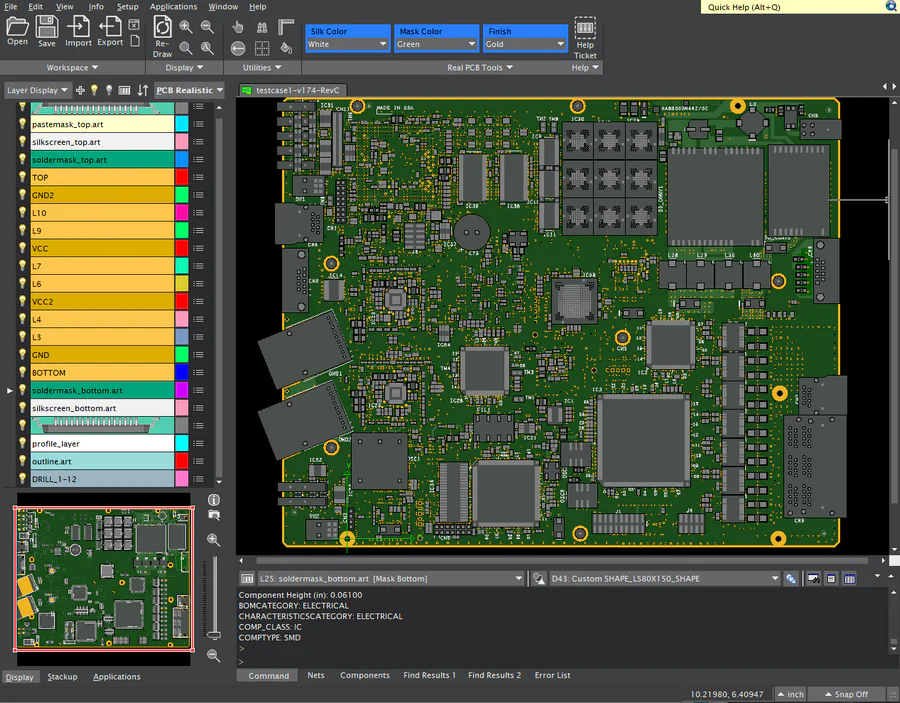
Quickly load Gerbers, Drills, and perform DFM Check
Let DFM Now! instantly verify whether your PCB design files (gerbers, drills, odb++) are ready for manufacturing; if there are problems DFM Now! shows you all error/warning locations along with descriptions and more. Fast, Easy, Safe & Secure
Load Gerbers, Run DFM Check, Browse Errors
 
Other DFM Now! Features
Generate PDF Checkplots
Assign Layer Types & Stackup, Blind/Buried Drill Setup
 
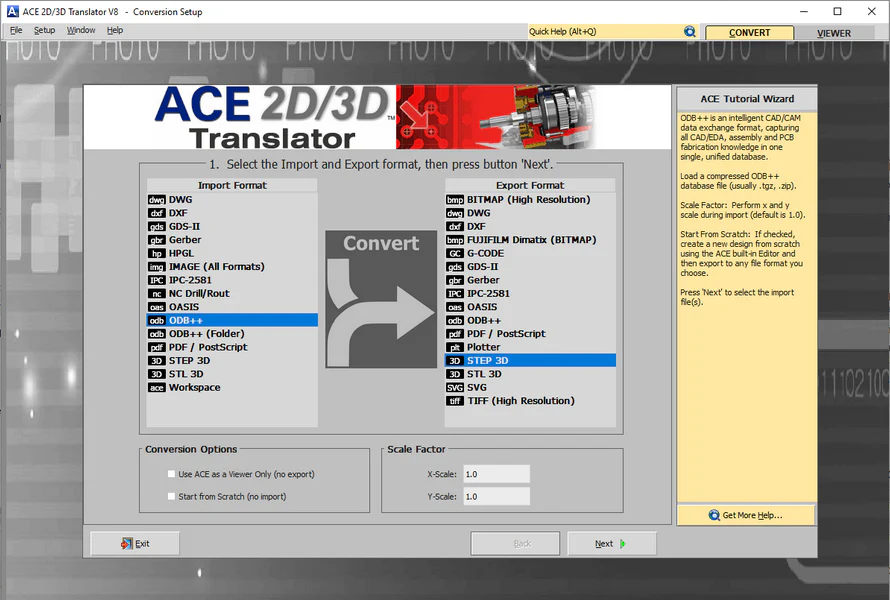
DFM Now! supports ODB++
Keep the Intelligence. Read & Write Valor's intelligent database ODB++. Improves interoperability between CAD, Fabrication, and Assembly. Watch Demo >


  LINKS SOLUTIONS POPULAR
  Twitter Gerber/CAM Downloads
  Blogs CAD Translation Customer Testimonials
  Support GDSII/MEMs Buy Now
  Forums AutoCAD PlugIns Partners
  About Us OEM/Custom Software Contact Us
 
© 2012 Numerical Innovations, a Division of Caneberra Technologies, Inc. All Rights Reserved.