
Designing a printed circuit board is one thing. Making sure that design is ready for manufacturing is another.
A PCB can pass electrical design rule checks (DRC) and still contain manufacturing issues that aren’t discovered until the files reach the fabrication facility.
Insufficient copper spacing, annular ring violations, drill registration problems, and other manufacturing concerns can lead to additional engineering reviews, revised files, and production delays.
The question is: Why wait until your PCB manufacturer finds these problems?
Design Rule Checks vs. Design for Manufacturing
Electrical design rule checks are an important part of PCB development. They help designers identify issues based on the constraints established within their CAD environment.
However, passing DRC doesn’t necessarily mean the final manufacturing files are free of potential fabrication issues.
Design for Manufacturing (DFM) checking takes the process further by examining manufacturing data against relevant fabrication constraints.
This can include reviewing:
- Copper spacing and minimum trace widths
- Annular rings and drill clearances
- Solder mask and silkscreen constraints
- Thermal connections and copper features
- Manufacturing layer alignment
- Netlist connectivity and potential shorts or opens
Performing these checks before releasing manufacturing files provides another opportunity to identify and investigate potential issues.
Why Early DFM Checking Matters
When manufacturing issues are identified after files have been submitted, engineering teams may need to investigate violations, revise their designs, regenerate manufacturing data, and resubmit the files.
These additional steps can create bottlenecks between engineering and production.
By reviewing manufacturing data earlier, teams can address potential problems before they interrupt the fabrication process.
Early DFM checking can help:
- Reduce unnecessary revision cycles
- Improve communication between design and manufacturing teams
- Identify potential fabrication issues sooner
- Support more consistent manufacturing preparation
- Minimize avoidable delays
The goal isn’t to eliminate the PCB manufacturer’s DFM review. It’s to make sure the files arriving at the factory have already undergone an appropriate internal verification process.
What Happens After You Generate Your Gerber Files?
Gerber, ODB++, IPC-2581, and drill files contain manufacturing information used to produce a PCB.
Once these files are generated, it’s important to verify that the exported data accurately represents the intended design and meets applicable manufacturing requirements.
This is where professional PCB CAM and DFM software becomes valuable.
Instead of relying exclusively on the original PCB CAD project, engineers can inspect the actual manufacturing outputs before releasing them to production.
How FAB 3000 V9 Helps
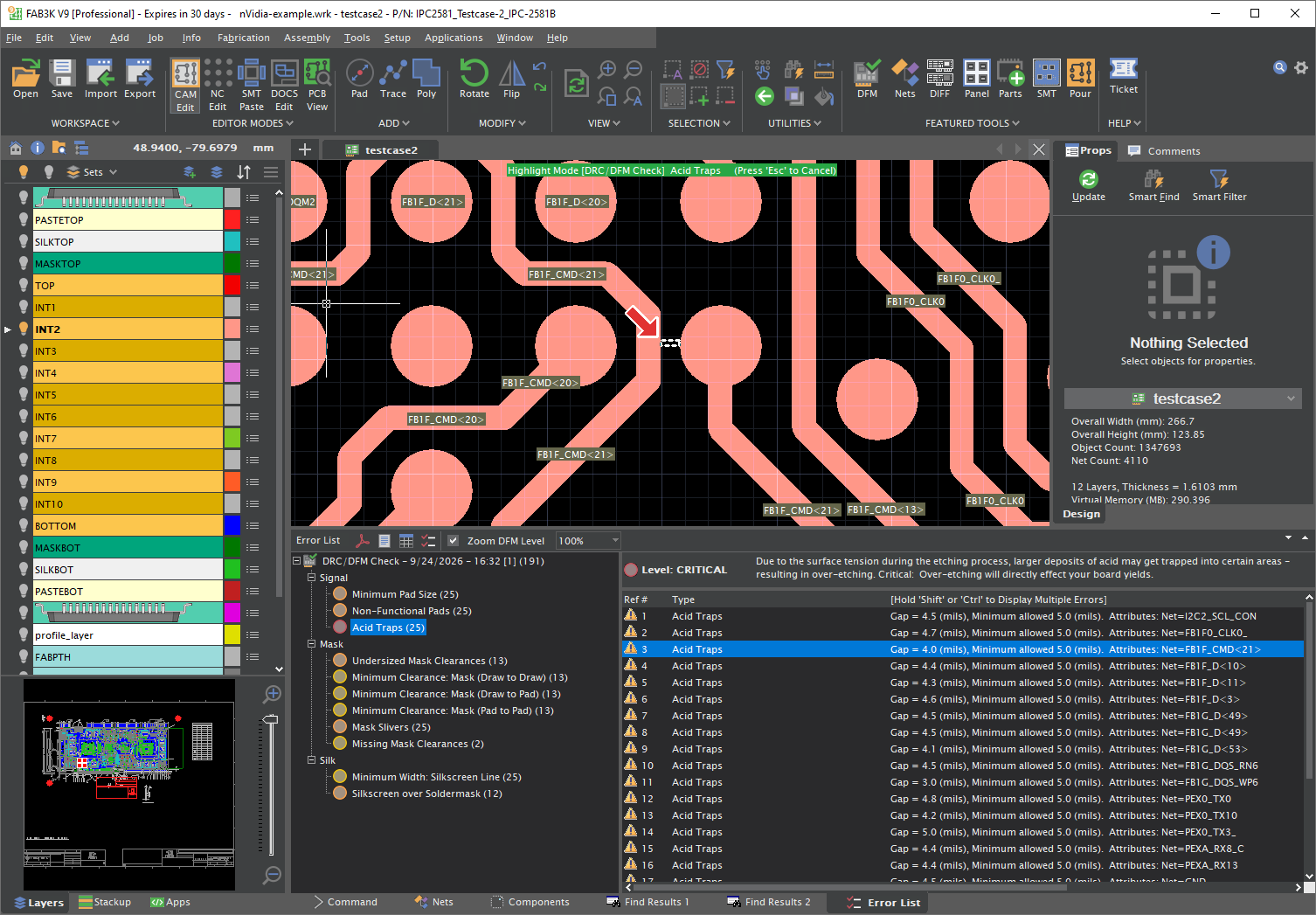
FAB 3000 V9 from Numerical Innovations provides professional PCB CAM and DFM tools for reviewing, verifying, and preparing manufacturing data.
Engineers can use FAB 3000 to:
- Import and inspect Gerber, ODB++, IPC-2581, and drill data
- Run DFM checks against applicable manufacturing constraints
- Investigate copper spacing, drill, and annular ring issues
- Perform netlist and layer comparisons
- Review and edit manufacturing data
- Generate DFM reports
- Prepare PCB data for fabrication
Beyond DFM checking, FAB 3000 includes additional professional CAM capabilities such as Gerber editing, panelization, file conversion, and manufacturing data preparation. See the full FAB 3000 features overview or the detailed feature comparison.
These tools help engineering and manufacturing teams identify potential problems before they become costly production issues.
Explore FAB 3000’s DFM capabilities: FAB 3000 PCB DFM checking
DFM Is a Shared Responsibility
PCB designers and manufacturers both play important roles in ensuring a board can be produced successfully.
Engineering teams should perform appropriate internal verification before releasing manufacturing files.
Fabricators then perform their own process-specific reviews based on their equipment, materials, tolerances, and manufacturing capabilities.
When both sides participate in the DFM process, communication improves and avoidable manufacturing problems can be identified earlier.
Catch Manufacturing Problems Before They Reach Fabrication
Manufacturing verification shouldn’t begin only after your PCB files arrive at the factory.
By incorporating DFM checking earlier in the engineering workflow, teams can identify potential issues, reduce unnecessary revisions, and improve manufacturing readiness.
Ready to review your PCB manufacturing files?
Explore our new PCB DFM Checking resource page to learn how FAB 3000 V9 helps engineers identify potential manufacturing problems before fabrication.
Tags: DFM · PCB Design · Gerber Files · FAB 3000 V9 · PCB Manufacturing